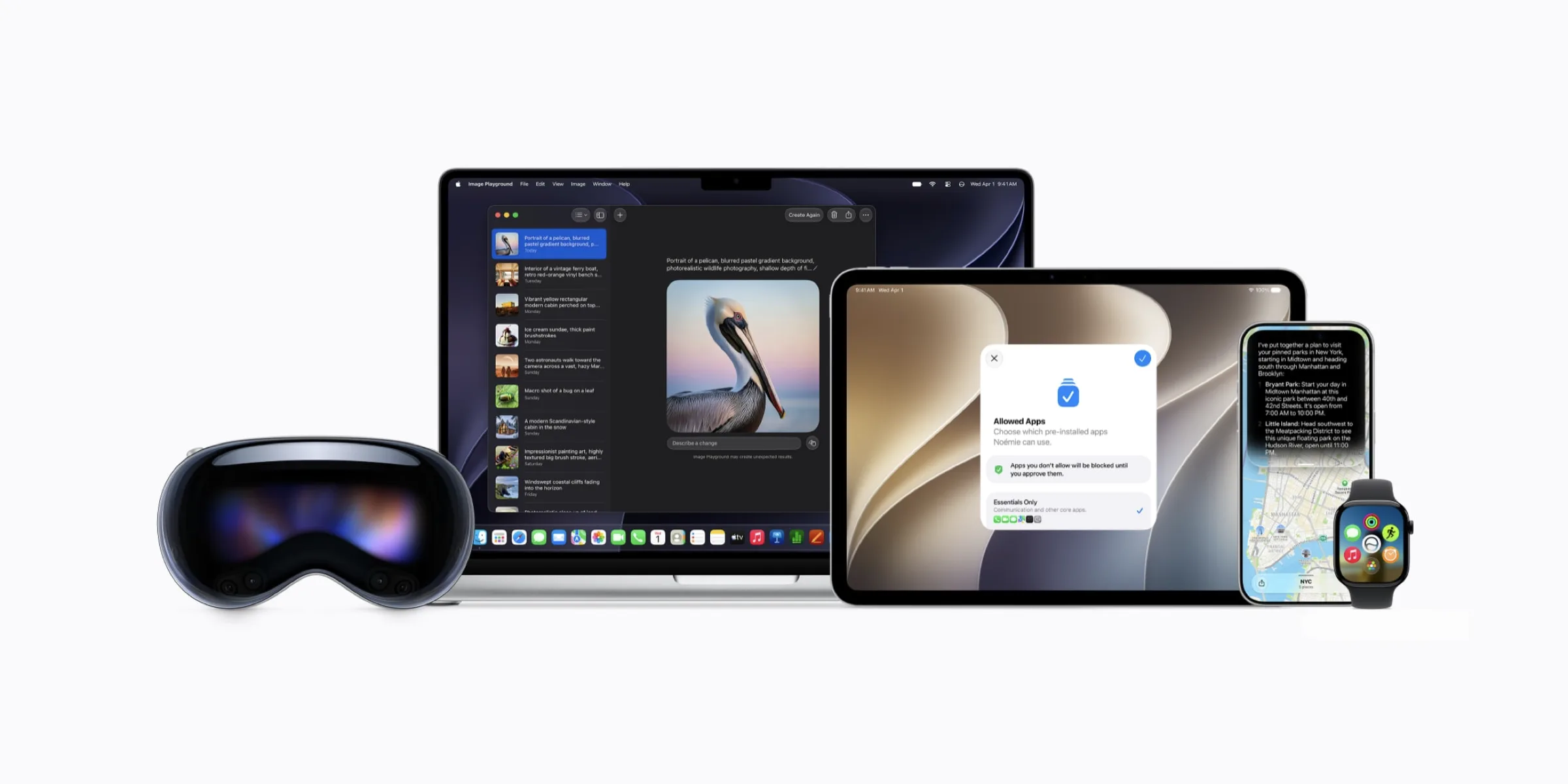
Apple, predictably, is taking a more structured and controlled route.
Apple’s vision for Apple Intelligence isn’t simply to make Siri a conversational chatbot. They are turning Siri into an on-device orchestrator that strings together context and actions across multiple apps to execute tasks reliably.
To make this happen, Apple officially deprecated the legacy SiriKit framework (used since iOS 10) in favor of the App Intents framework. By adopting App Intents, your app exposes its core capabilities directly to Apple Foundation Models (AFM) running on-device and via Private Cloud Compute.
Here is what product leaders and iOS builders need to know to make their apps discoverable to Siri in Apple’s new AI ecosystem.
The Apple way: Structured, controlled, and schema-driven
While Google’s Android approach lets developers describe app capabilities loosely in natural language, Apple enforces a strict, standardized vocabulary through App Schemas.
Think of App Schemas as a pre-trained dictionary that Apple built directly into Siri. When your app conforms to these schemas, Siri understands your features natively — knowing how to reason about them, ask for user confirmation, and infer context from surrounding conversations.
App Schemas are organized into specific functional Domains. In the latest iOS releases, Apple has expanded these domains across key app categories:
System & Productivity: Calendar, Clock, Files, Mail, Messages, Notes, Phone, Photos, Reminders.
Media & Utility: Audio, Camera, Maps, System & In-app Search.
There is a catch: While you can adopt individual schemas across most domains, Apple requires complete compliance for certain core domains — like Mail, Clock, and Messages. If your app falls into one of those categories, partial implementation isn't an option; you must adopt all of that domain's schemas.
Thinking in entities and intents (not screens)
Preparing an iOS app for Apple Intelligence requires moving away from screen-based thinking. Apple asks developers to break their apps down into two core building blocks:
App Entities: The core data concepts you want to expose to the OS — such as a photo asset, a calendar event, a message, or a contact.
App Intents: The actual code that performs an action on those entities — such as sendMessage, draftEmail, or favoriteLandmark.
Architecturally, Apple explicitly recommends creating a lightweight subset of your existing data models for your App Entities, rather than exposing your heavy database models directly.
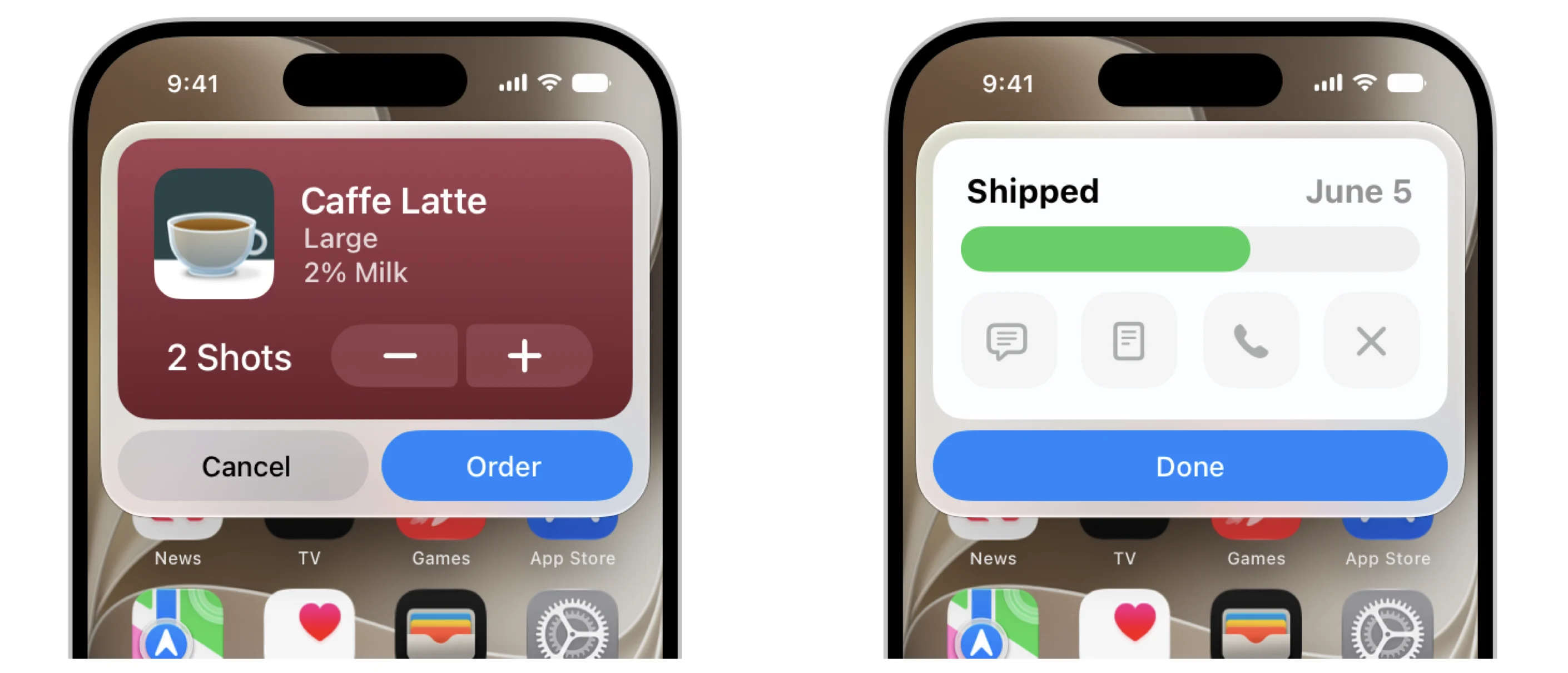
App Intents allow developers to expose specific, lightweight actions — like ordering a coffee or tracking a package — without forcing the user to open the full app interface. SOURCE: Apple Developer
If your app’s core intelligence is tangled up with the code that builds your visual screens or manages your database, pulling out the exact information Siri needs will be a massive chore. This is why a well-organized technical foundation is essential. By completely separating your app’s "brain" (the core business rules) from its "face" (the visual interface), your software can easily hand data directly to Siri behind the scenes, without ever needing to load the app's screens.
Snippet Views: Protecting your visual brand
One of the biggest worries brand leaders have about AI is losing their visual identity. If Siri handles the request, does your brand become invisible?
Apple’s solution is Snippet Views.
Snippet Views are custom, branded SwiftUI cards that your app presents directly inside the Siri conversation, Spotlight search results, Control Center, or the Action Button. Instead of dropping the user into a plain text bubble, Siri renders your custom UI mid-chat.
Snippet Views come in two flavors:
Result Snippets: Static or interactive cards that display requested information (e.g., showing a package tracking bar or an event summary).
Confirmation Snippets: Cards that prompt the user to input data or confirm an action (e.g., selecting extra coffee shots or tapping "Order").
Snippet Views preserve your visual brand without forcing the user to switch context. However, Apple has strict rules for how these should look. According to Apple’s Human Interface Guidelines (HIG), Snippet Views must maintain high legibility, use specific action labels on primary buttons (e.g., "Order" instead of "OK"), and be capped at a maximum height of 400 pt to ensure brevity.
Visualizing the handoff: Two real-world flows
To see exactly how App Intents, Entities, and Snippet Views work together, let's look at two use cases Apple highlighted during its WWDC developer sessions. Using hypothetical apps, including a native messaging tool and a custom app called "Travel Tracking," Apple demonstrated exactly how seamless the AI handoff should feel.
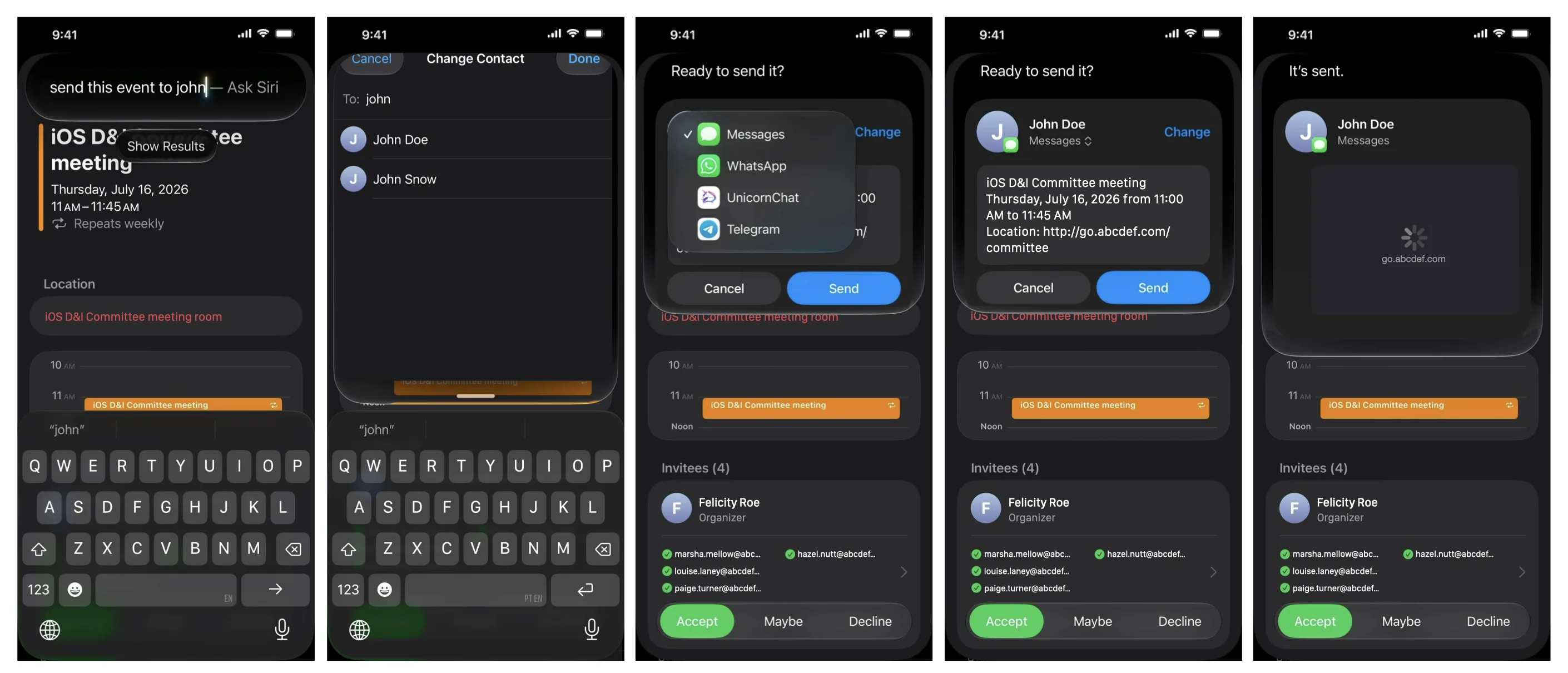
1. The multi-app system handoff
A user is looking at a calendar app and says, "Siri, send this event to John."
Intent & Entities: Siri identifies the calendar event entity on screen and invokes the sendMessage intent from a messaging app.
Snippet View: Siri renders a confirmation Snippet View showing a draft message preview with a "Change Contact" option.
Completion: The user taps "Send" inside the snippet. The message fires in the background, and Siri confirms "It's sent" — all without launching the messaging app.
Siri orchestrates data across apps — taking a calendar event entity and passing it to a messaging app intent via a confirmation snippet.]
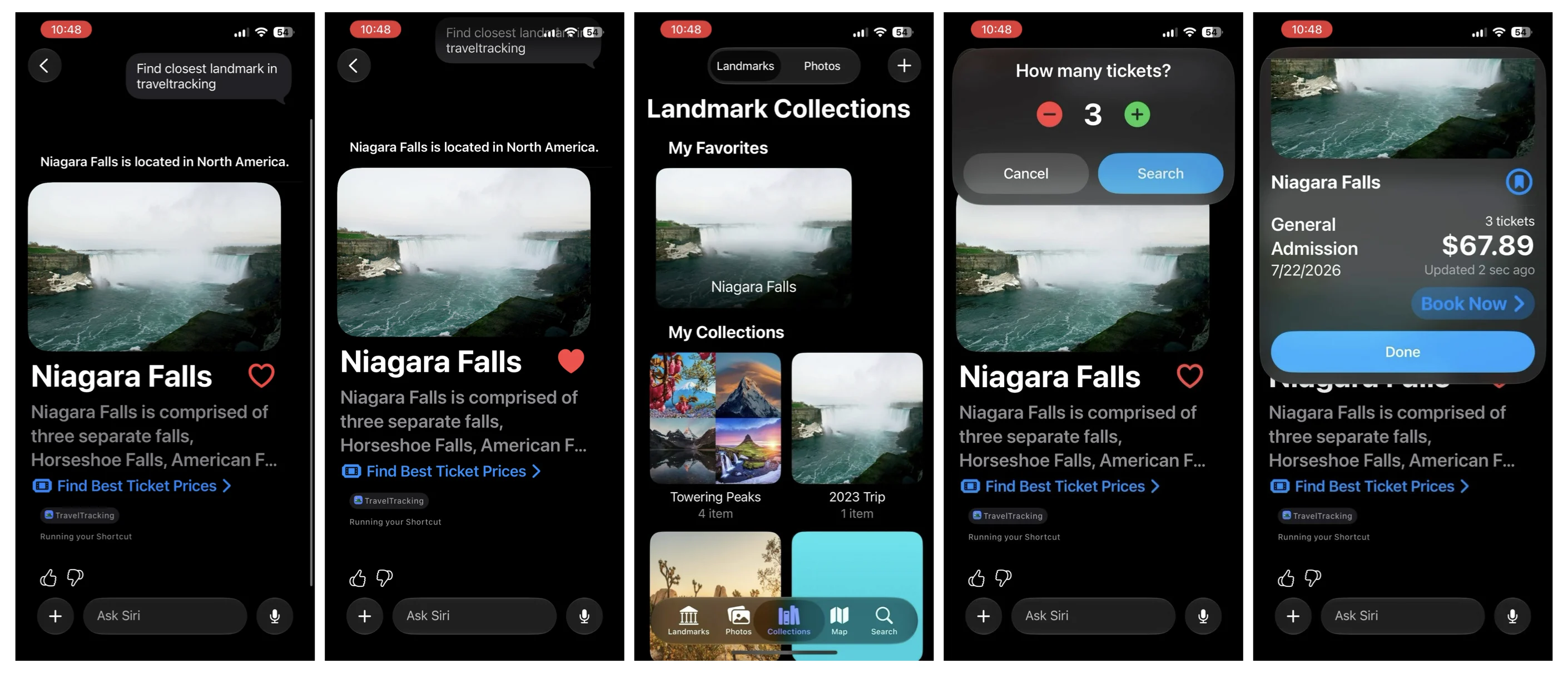
2. Custom intents and chained snippets
A user says, "Find the closest landmark in Travel Tracking."
Custom Intent: Because this doesn't match an active App Schema, Siri triggers the travel app’s Shortcut, which then triggers a custom App Intent.
Result Snippet: Siri displays a custom Snippet View for "Niagara Falls" with custom interactive buttons.
Chained Intent: Tapping "Buy Tickets" inside the snippet triggers a follow-up intent, bringing up a second snippet to select ticket quantities and confirm the purchase price directly inside Siri.
Snippet Views can be chained together to walk users through multi-step workflows — like finding a landmark and purchasing admission tickets — right inside the Siri interface.
Common mistakes iOS teams may make
As your team prepares for the latest Apple Intelligence, watch out for these common traps:
Waiting for the "perfect" App Schema: Don't delay development just because Apple hasn't released an App Schema tailored specifically to your niche. Other system features, including Spotlight, Shortcuts, and Control Center, can use custom App Intents and Entities today, even if they don't conform to a system schema.
Reusing screen UI blindly: While Apple allows you to reuse SwiftUI components inside Snippet Views, snippets require a dedicated design effort. Cramming a full app screen into a 400 pt snippet container results in a terrible experience.
Treating Siri like old-school voice commands: Siri is no longer looking for rigid keyword triggers. If your data models aren't cleanly separated into App Entities, Siri won't have the semantic context needed to reason about your app in natural language conversations.
Practical steps for iOS teams over the next 6–12 months
To ensure your app thrives in Apple’s new AI ecosystem, here are the next steps your iOS development team should follow today:
Audit Apple’s App Schemas: Evaluate the newest schema domains (Audio, Calendar, Files, Mail, Messages, Photos, Reminders, etc.) and identify which Entities and Intents map to your existing app features.
Design your Snippet View journeys: Map out how Snippet Views can lead into follow-up intents or hand off to specific screens inside your main app.
Clean up your core architecture: Pay off technical debt by untangling your data models from your UI. Build a lightweight caching layer so Siri can retrieve App Entities quickly without lagging the system interface.
Ready to make your iOS app Siri-ready?
Apple Intelligence is changing how Siri discovers and interacts with apps, but your app doesn't have to get left behind. For over 15 years, ArcTouch has helped world-class brands build lovable apps and connected experiences across the Apple ecosystem. Whether you need an architecture audit, assistance implementing AppIntents, or a custom Snippet View design strategy, our iOS experts are here to help.