The new Gemini interface: How to optimize your app for AppFunctions
Gemini is becoming the new front door for Android. Here is how your team can use Google’s AppFunctions API to ensure your product stays visible in an AI-first world
We help companies of all sizes build lovable apps, websites, and connected experiences.
In the wake of Google I/O and Apple’s WWDC, we recently wrote about how mobile platform AI is changing how users discover and interact with software. But let's clear up one big misconception right away: the traditional app interface isn't disappearing. Instead, system-level AI is simply becoming a more prominent front door to your app’s best features.
But there is a catch: How does Gemini actually know what your app can do?
Currently, Gemini does a lot of guessing. It uses screen reading, optical character recognition (OCR), and accessibility metadata to infer your app's purpose by looking at its buttons and visual hierarchy. Giving Gemini that decision-making control to make those assumptions is risky.
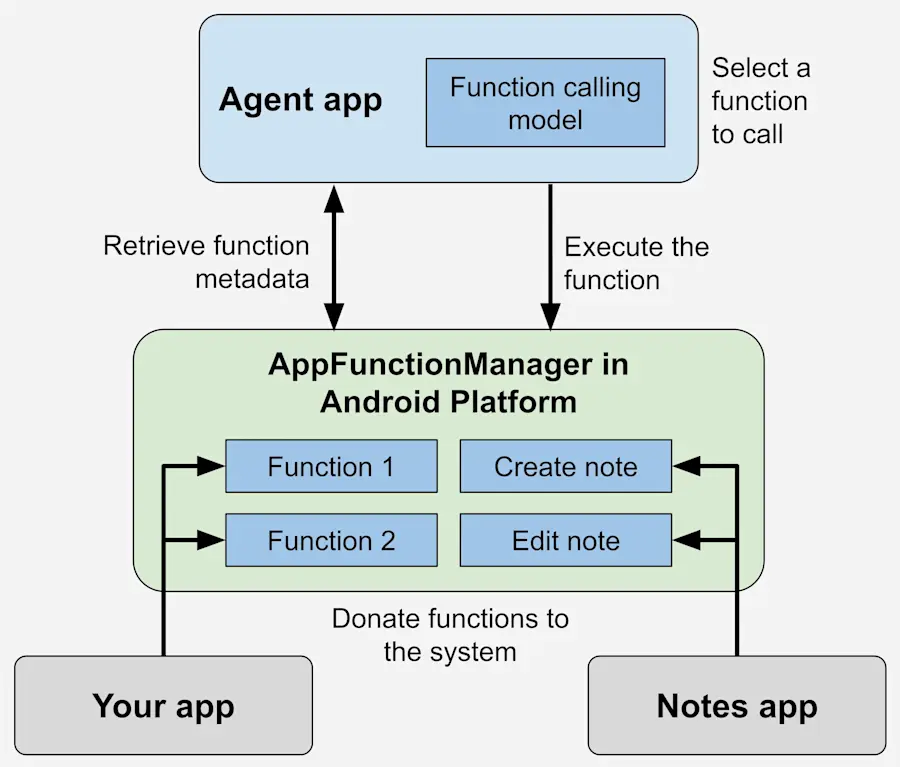
Enter AppFunctions. Introduced as an Android 16 platform API and Jetpack library, AppFunctions eliminate the guessing game. They provide a direct, on-device contract that tells Gemini exactly what your app can do, what parameters it needs, and what results to expect. It is the mobile equivalent of the Model Context Protocol (MCP) that developers use for cloud-based AI software.
SOURCE: Android Developer
AppFunctions move Android from an interface-first platform to a capability-first platform. For brand leaders and product builders, mastering this protocol is the key to surviving the AI transition. Here is what you need to know.
The architectural reality check: Why the UI is no longer the main event
The biggest hurdle in supporting Gemini isn't learning a new Google API — it is paying off your app's technical debt. Gemini is proving that the visual UI is no longer the sole entry point to your application.
For years, many legacy Android apps were built tightly around screens. If a user wanted to transfer money, the app had to load the visual "Transfer Screen" to execute the code.
That model is now broken. If your app relies on loading a UI state to execute a basic task, it is not ready for AI.
If your app’s core intelligence is tangled up with the code that builds your visual screens (like ViewModels or activities), executing background tasks for Gemini will be a massive chore. To support Gemini, your app's business logic must operate independently of its presentation layer. By completely separating your app’s "brain" (the core business rules) from its "face" (the visual interface), Gemini simply becomes a new client that can trigger actions without ever needing to load the app's screens.
Thinking in capabilities, not screens
To succeed in this new ecosystem, builders must stop thinking in navigation paths and start thinking in user intents.
Gemini does not care if you have a beautifully designed Checkout Screen or Transfer Screen. It only cares that your app has the capability to CreateOrder or TransferMoney.
When you expose AppFunctions, you should never expose UI events like ClickButton or SelectTab. Those are implementation details. Instead, you expose complete business operations. This allows Android to enable a hybrid handoff:
Low-risk, low-complexity tasks: A user says, "Gemini, reorder my usual Tuesday coffee." Gemini hits the background App Function, passes the order parameters, and confirms the purchase. The app never visibly opens.
High-risk, high-complexity tasks: A user says, "Gemini, transfer $5,000 to my contractor." Gemini can initiate the intent, but it will seamlessly hand the user off to your full banking app for visual verification, security checks, and final approval.
AI excels at rapid execution, but humans still require visual interfaces for exploration, comparison, and trust.
The SEO of the AI era: Why you shouldn't let Gemini guess
Currently, AppFunctions and deep Gemini integrations are in early beta testing on premium devices like the Galaxy S26 and Pixel 10. Because of this, some product leaders might be tempted to wait and let Gemini just figure out their app passively through screen scraping.
Do not do this.
You must treat AppFunctions like Search Engine Optimization (SEO) for the AI era. Over the last 20 years, we optimized websites with metadata so that Google Search could understand them. Today, we must structure our application capabilities so Gemini can discover, recommend, and orchestrate them perfectly.
This also completely changes how we view accessibility. Standard accessibility practices (like content descriptions and semantic labels) are no longer just about human inclusion; they are vital tools for machine readability.
Here is the easiest way to think about it: accessibility is descriptive (it tells AI what the user sees), while App Functions are declarative (they tell AI exactly what the app can do). Together, they make your software understandable to both people and conversational agents like Gemini and Siri.
Redefining mobile success metrics
If users can experience some of your app features via Gemini without ever looking at your screens, how do you measure success?
This is the hardest mental pivot for business stakeholders. For 15 years, product teams have measured success through Daily Active Users (DAU), screen views, navigation funnels, and session lengths.
In an AI-first world, those metrics lose some of their meaning. If a user completes a task instantly through a background App Function, their screen time inside your app will decrease — but that actually represents a reduction in friction and a better user experience.
Product leaders must shift their KPIs. Moving forward, the metrics that matter are AI-initiated engagement, successful app handoffs, completed tasks, and ultimate business outcomes.
Practical steps for Android teams over the next 6-12 months
To ensure your app thrives in Google’s new AI ecosystem, here are some actions your Android development team should take today:
Audit the architecture: Ask the ultimate test question: "Can our app's core business logic run entirely without the UI?" If the answer is no, start there.
Inventory your core capabilities: Map out the 3 to 5 most valuable, repetitive verbs your app performs (e.g., Track Package, Book Appointment, Reorder Item).
Clean up the domain layer: Extract business rules out of your ViewModels and Activities so they are stateless, reusable, and ready to be exposed as APIs.
Strengthen your metadata: Use highly descriptive naming conventions (like KDoc), so both human developers and AI models can easily parse your code's purpose.
Start small: When you are ready to implement AppFunctions, don't expose everything at once. Pick one or two high-value, low-risk capabilities to test as a pilot.
Ready to make your Android app Gemini-ready?
The Android landscape is shifting fast, but you don't have to navigate it alone. For more than 15 years, ArcTouch has helped the Fortune 500 and leading brands build lovable apps, websites, and connected experiences. Whether you want to audit your current codebase for Gemini compatibility, untangle your business logic from your UI, or build a proof-of-concept using AppFunctions, our Android experts are here to help.